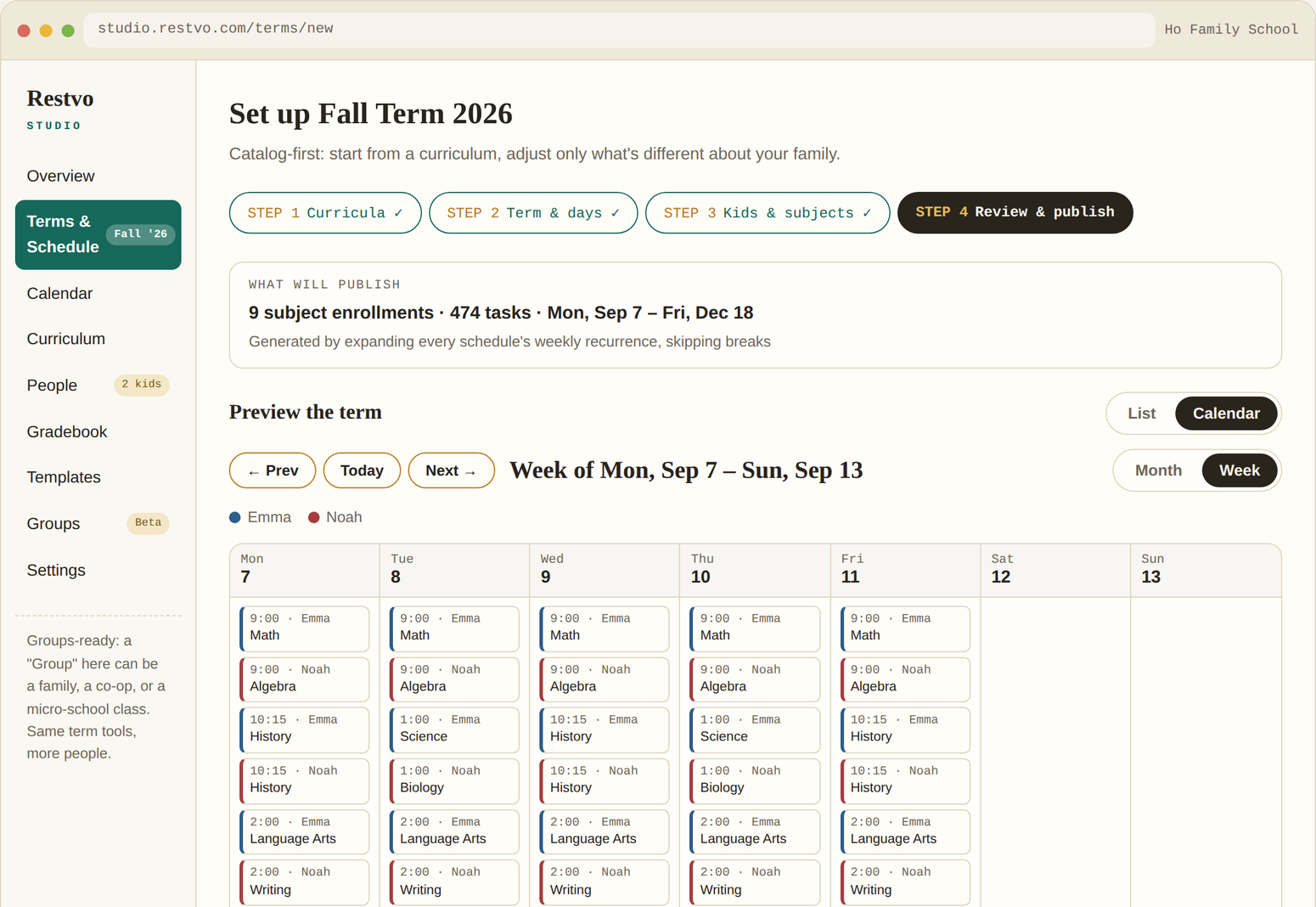
A term is one stretch of school — a semester, a school year, a summer session. It has a start date, an end date, and a weekly pattern of school days. You design a term once, in Studio Mode's setup wizard, and Restvo carries it: every lesson in every subject lands on the calendar, and from the first day of term each child's Companion Mode simply shows today.
Open Studio Mode, choose New term, and the wizard walks you through three steps.
Step 1 — Your kids
Add each child who will learn in this term. For each one, Studio Mode issues a Companion login on the spot: a username and a six-digit access code for you to hand over in person. Children under 13 need no email address. Teens may add one, if you allow it.
Kids you have added before are already there — a returning child keeps their login, their grades, and their history. You are only choosing who learns this term.
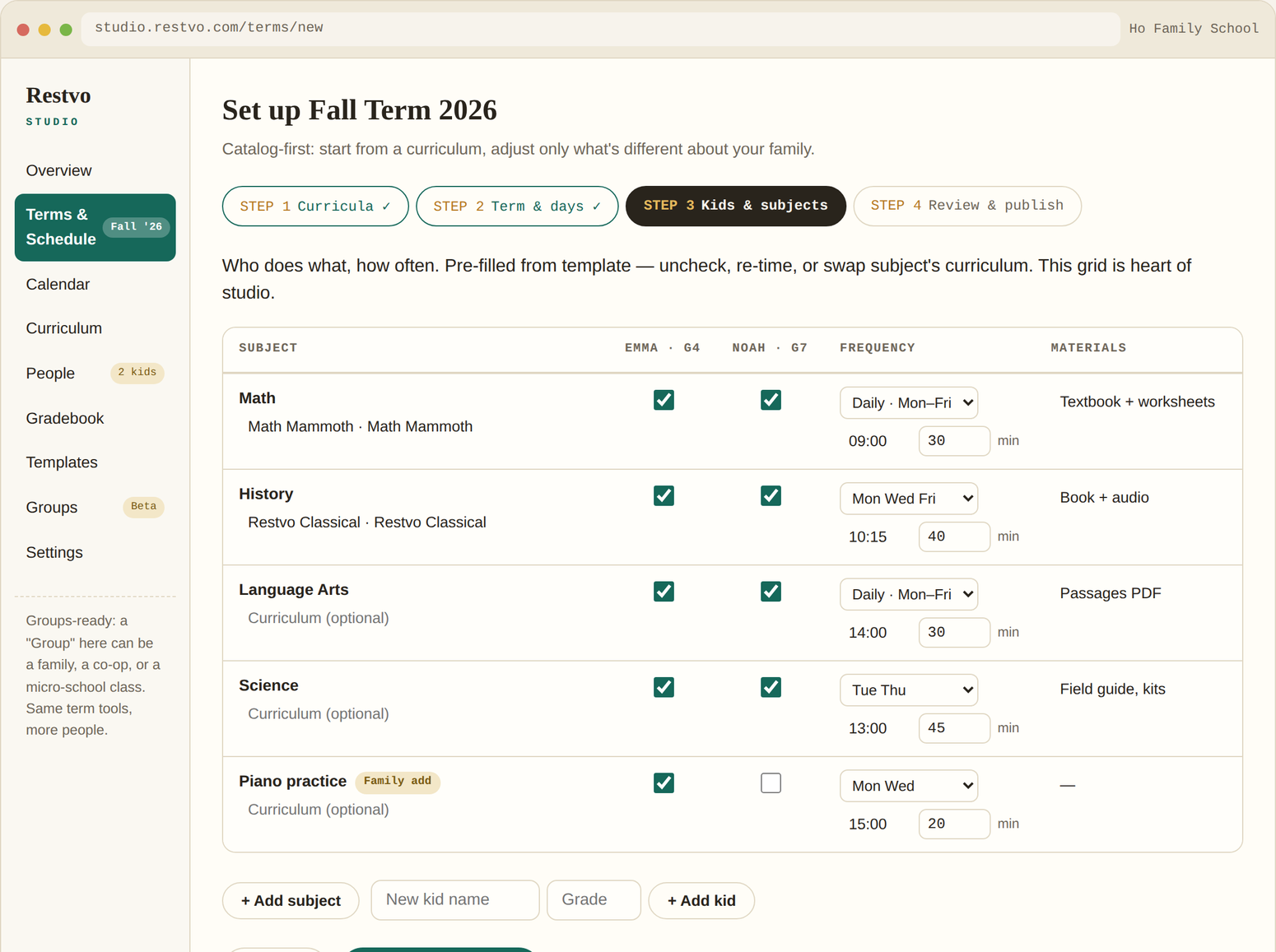
Step 2 — Subjects and time blocks
For each child, choose their subjects and place each subject in the week as a block: the days it meets, the time it starts, how long it runs. Most families accept the classical defaults and adjust one or two:
- Math — first thing, 9:00–10:30, every school day. Math is a schedule-only placeholder: you pick the curriculum your family already uses (Math Mammoth, Math-U-See, Art of Problem Solving, or another you name) and the child's grade level, and every session is simply labelled, for example, Math Mammoth, Grade 5. Its length follows the grade — 45 minutes for K–4, an hour for grades 5–6, an hour and a quarter for 7–8, an hour and a half for 9–12 — so there is no duration to set.
- Great Books reading — the morning slot of English, Monday, Wednesday, and Friday at 10:30.
- Language arts (ELA) — the afternoon slot, 2:30 by default. An ELA block is flexible: it may sit in a morning slot instead if your family runs that way.
- History — the spine subject. Writing rides inside it as a sub-block under the History lesson block, because every writing task is drawn from the history lesson; there is no separate Writing block to schedule.
Subjects come from the catalog — the free Restvo Classical shelf is there by default — or from curricula of your own. At the Rhetoric stage (grades 9–12) there is no afternoon language-arts block to place: English and History have fused into Great Books, and the wizard knows it.
Step 3 — Preview and publish
The last step shows the whole term on a calendar, for every child, before anything is live. Check the shape of a normal week. Drag a block to a better time. Add break weeks — holidays, travel, the week the baby is due — and watch the lessons flow around them. Nothing is final until you publish.
On publish, the term goes live: lessons appear on the calendar, and each child's Companion Mode starts showing Today from the term's first day.
After publishing
A published term is not set in stone. Times change, subjects are added, a child finishes a book early — all of that is ordinary editing, covered in Editing Terms, and none of it requires rebuilding the term. Grades and completed work are never touched by an edit.
Tip: set up the term for the family you actually have, not the one in the brochure. Two honest blocks a day, kept, beat five ambitious ones abandoned by October.